0x00

看似最简单的输入输出其实要到这里才实现

0x01 输出

其实在之前就实现了输出如下,就是与 I/O 接口交互以及写显存的过程

1
2
3
4
5
6
7
8
9
10
11
12
13
14
15
16
17
18
19
20
21
22
23
24
25
26
27
28
29
30
31
32
33
34
35
36
37
38
39
40
41
42
43
44
45
46
47
48
49
50
51
52
53
54
55
56
57
58
59
60
61
62
63
64
65
66
67
68
69
70
71
72
73
74
75
76
77
78
79
80
81
82
83
84
85
86
87
88
89
90
91
92
93
94
95
96
97
98
99
100
101
102
103
104
105
106
107
108
109
110
111
112
113
114
115
116
117
118
119
120
121
122
123
124
125
126
127
128
129
130
131
132
133
134
135
136
137
138
139
140
141
142
143
144
145
146
147
148
149
150
151
152
153
154
155
156
157
158
159
160
161
162
163
164
165
166
167
168
169
170
171
172
173
174
175
176
177
178
179
180
181
182
183
184
185
186
187
188
189
190
191
192
193
194
195
196
197
198
199
200
201
202
203
204
205
206
207
208
209
210
211
212
213
214
215
216
217
218
219
220
221
222
223
224
225
226
227
228
229
230
231
232
233
234
235
236
237
238
239
240
241
242
243
244
245
246
247
248
249
250
251
252
253
254
255
256
257
258
259
260
261
262
263
264
265
266
267
268
269
270
271
272
273
274
275
276
277
278
279
280
281
282
283
284
285
286
287
288
289
290
291
292
293
294
295
296
297
TI_GDT equ 0
RPL0 equ 0
SELECTOR_VIDEO equ (0x0003<<3) + TI_GDT + RPL0

; | Index | 名称 | 访问|
; | -------- | ------------------------- | --- |
; | `00h` | Horizontal Total | R/W |
; | `01h` | End Horizontal Display | R/W |
; | `02h` | Start Horizontal Blanking | R/W |
; | `03h` | End Horizontal Blanking | R/W |
; | `04h` | Start Horizontal Retrace | R/W |
; | `05h` | End Horizontal Retrace | R/W |
; | `06h` | Vertical Total | R/W |
; | `07h` | Overflow Register | R/W |
; | `08h` | Preset Row Scan | R/W |
; | `09h` | Maximum Scan Line | R/W |
; | `0Ah` | Cursor Start Register | R/W |
; | `0Bh` | Cursor End Register | R/W |
; | `0Ch` | Start Address High | R/W |
; | `0Dh` | Start Address Low | R/W |
; | `0Eh` | Cursor Location High | R/W |
; | `0Fh` | Cursor Location Low | R/W |
; | `10h` | Vertical Retrace Start | R/W |
; | `11h` | Vertical Retrace End | R/W |
; | `12h` | Vertical Display End | R/W |
; | `13h` | Offset Register | R/W |
; | `14h` | Underline Location | R/W |
; | `15h` | Start Vertical Blanking | R/W |
; | `16h` | End Vertical Blanking | R/W |
; | `17h` | CRTC Mode Control | R/W |
; | `18h` | Line Compare Register | R/W |

; | 功能 | I/O 端口(读/写)
; | **CRT Controller Index Register** — 选择要访问的子寄存器 | `0x3B4` / `0x3D4`(取决于显示模式)
; | **CRT Controller Data Register** — 读写所选子寄存器的数据 | `0x3B5` / `0x3D5`(取决于显示模式)

; index reg 设置后,对 data reg 的读写就是对 index reg 指定的寄存器的读写

; 屏幕 80*25 字节, 一个字符两字节, 光标值是字符索引

[bits 32]

section .data
put_int_buffer dq 0 ; 8 字节缓冲区
section .text
; ================= 打印单字符函数
global _put_char
_put_char:
push ebp
mov ebp, esp
pushad ; 将 32 位通用寄存器全部压栈 后续使用 popad 恢复
mov ax, SELECTOR_VIDEO
mov gs, ax ; 设置好 gs 以防范万一
; ================= 获取光标位置
mov dx, 0x3d4
mov al, 0xe
out dx, al
mov dx, 0x3d5
in al, dx
mov ah, al ;获取高8位
mov dx, 0x3d4
mov al, 0xf
out dx, al
mov dx, 0x3d5
in al, dx ;获取低8位
mov bx, ax ; 存入 bx

mov cl, [ebp + 8] ;跳过ebp和返回地址获取参数
cmp cl, 0xd
jz .is_CR ; 回车
cmp cl, 0xa
jz .is_LF ; 换行
cmp cl, 0x8
jz .is_backspace ; 退格
jmp .put_other

; ==================== 回车
.is_CR:
xor dx, dx ;dx是被除数的高16位,清0
mov ax, bx ;ax 是被除数的低16位
mov si, 80
div si ;光标值减去除以80的余数便是取整,div指令中dx存放余数
sub bx, dx ;光标移动到首列
jmp .set_cursor

; ===================== 退格
.is_backspace:
cmp bx, 0
jz .set_cursor ; 如果光标值为0则不处理
dec bx ;光标值是字符索引, 先把光标值减一
shl bx,1 ;一个字符占2字节,乘2得到光标在显存的偏移
mov byte [gs:bx], 0x20 ;将待删除字符低字节传入0x20, 指空格
inc bx
mov byte [gs:bx], 0x7 ;高字节传入0x7 表示黑屏白字
shr bx, 1 ;恢复光标值
jmp .set_cursor
; ===================== 其他正常字符
.put_other:
shl bx,1 ;表示对应显存中的偏移字节
mov [gs:bx], cl ;ASCII字符本身
inc bx
mov byte[gs:bx], 0x07 ;字符属性
shr bx, 1 ;下一个光标值
inc bx
cmp bx, 2000
jl .set_cursor ;若小于2000,则表示没写道显存最后,因为80×25=2000
; 否则继续往下执行换行和滚屏
; ===================== 换行 (我设置为\n同时执行\r和狭义的\n)
.is_LF:
xor dx, dx ;dx是被除数的高16位,清0
mov ax, bx ;ax 是被除数的低16位
mov si, 80
div si ;光标值减去除以80的余数便是取整,div指令中dx存放余数
sub bx, dx ;光标移动到首列
add bx, 80 ;换行加上80
cmp bx, 2000
jl .set_cursor ; 大于2000则往下执行滚屏

;====================== 滚屏
;将1~24行搬运到0~23,然后24行填充空格
.roll_screen:
cld ;设置方向标志位为增
mov ecx, 960 ;2000-80=1920,共1920×2=3840个字符,而movsd一次复制4字节,所以需要3840/4=960次
mov esi, 0xc00b80a0 ;第1行行首
mov edi, 0xc00b8000 ;第0行行首
rep movsd ;循环复制
; ==== 将最后一行填充为空白
mov ebx, 3840 ;最后一行首字符的地一个字节偏移 = 1920×2
mov ecx, 80
.cls:
mov word [gs:ebx], 0x0720 ;0x0720是黑底白字空格
add ebx, 2
loop .cls
mov bx, 1920 ; 移动光标至最后一行开头
; 滚屏完成默认往下写回光标
; ================== 写回光标值
.set_cursor:
mov dx, 0x03d4
mov al, 0x0e
out dx, al
mov dx, 0x03d5
mov al, bh
out dx, al ; 写回高八位

mov dx, 0x03d4
mov al, 0x0f
out dx, al
mov dx, 0x03d5
mov al, bl
out dx, al ; 写回低八位

.put_char_done:
popad ; 恢复通用寄存器
leave
ret

; =================== 打印字符串函数
global _put_str
_put_str:
push ebp
mov ebp, esp
push ebx ;此函数只用到了ebx和ecx
push ecx
xor ecx, ecx
mov ebx, [ebp + 8] ;获取打印字符串地址
.go_on:
mov cl, [ebx]
cmp cl, 0 ;若这里为0则说明到了字符串末尾
jz .str_over
push ecx ;为put_char函数传递参数
call _put_char
add esp, 4 ;清理栈中参数
inc ebx
jmp .go_on

.str_over:
pop ecx
pop ebx
leave
ret

; =================== 打印无符号整数函数
global _put_uint
_put_uint:
push ebp
mov ebp, esp
pushad
mov eax, [ebp + 8] ; 获取参数
mov edx, eax ; 保存参数
mov edi, 7 ; buffer 初始偏移量, 从最后一个开始写
mov ecx, 8 ;32位数据中16位数据占8位
mov ebx, put_int_buffer
; ======= 转 ascii
.hex_to_ascii: ;每4位二进制是十六进制的1位
and edx, 0x0000000f ;解析十六进制的每一位
cmp edx, 9 ;数字0~9和a~f分别处理成 ascii 码
jg .above_9
add edx, '0'
jmp .store
.above_9:
sub edx, 10
add edx, 'A'

.store:
mov [ebx+edi], dl ;此时dl中应该是数字对应的ASCII码
dec edi
shr eax, 4
mov edx, eax ; 更新一下edx中待处理参数
loop .hex_to_ascii

; ======= 去除前导 0
.ready_to_print:
inc edi ;此时edi为-1(0xFFFFFFFF),加一变为0
.skip_prefix_0:
cmp edi, 8 ;若已经比较到第9个字符了则表示待打印字符串全为0
je .full0
; 去除前导0后edi作为非0的最高位字符的偏移
.go_on_skip:
mov cl, [put_int_buffer + edi]
inc edi
cmp cl, '0'
je .skip_prefix_0 ;继续判断下一个字符
dec edi ;由于edi指向的是下一个字符,所以这里得减一是的edi指向当前不为0字符
; ======== 输出 0x 前缀
push dword '0'
call _put_char
add esp, 4
push dword 'x'
call _put_char
add esp, 4
jmp .put_each_num

; ========== 输出数字
.full0:
mov cl, '0' ;输入全为0,则只打因0
.put_each_num:
push ecx ;此时cl中为可打印字符
call _put_char
add esp, 4 ;清理栈中参数
inc edi
mov cl, [put_int_buffer + edi]
cmp edi, 8
jl .put_each_num
popad
leave
ret

; ======================= 打印有符号整数函数
global _put_int
_put_int:
push ebp
mov ebp, esp
pushad
mov eax, [ebp + 8] ; 获取参数
cmp eax, 0
jge .positive
; ===== 负数处理
mov cl, '-' ; 先输出负号
push ecx
call _put_char
add esp, 4
not eax
inc eax ; 再取绝对值(按位取反再加一)
; ====== 统一走无符号输出
.positive:
push eax
call _put_uint
add esp, 4
popad
leave
ret


global set_cursor
set_cursor:
push ebp
mov ebp, esp
pushad
mov bx, [ebp+8]
; ===== 先设置高8位
mov dx, 0x03d4
mov al, 0x0e
out dx, al
mov dx, 0x03d5
mov al, bh
out dx, al

; ===== 再设置低8位
mov dx, 0x03d4
mov al, 0x0f
out dx, al
mov dx, 0x03d5
mov al, bl
out dx, al
popad
leave
ret

从中导出的几个函数就是最基本的输出函数底层实现如下

1
2
3
4
5
6
7
8
9
10
11
12
13
14
15
16
17
18
19
20
21
22
#ifndef __LIB_KERNEL_PRINT_H
#define __LIB_KERNEL_PRINT_H
#include "stdint.h"

void _put_char(uint8_t char_asci);
void _put_str(char* message);
void _put_uint(uint32_t num); //以十六进制打印
void _put_int(int32_t num);
// print宏来封装这四个打印函数
#define print(x) _Generic((x), \
char: _put_char, \
unsigned char: _put_char, \
char*: _put_str, \
const char*: _put_str, \
int: _put_int, \
unsigned int: _put_uint, \
default: _put_str \
)(x)

void set_cursor(uint32_t cursor_pos);

#endif

_Generic 宏意思是在编译器根据类型分发编译,毕竟 c 语言没有原生的重载机制。为了方便我们使用这样一个宏。(之前的出现的 print 函数也是用类似的宏实现的).

虽然这些输出函数之前就实现了,但是并不线程安全,所以在实现线程调度和锁机制后,专门再写了线程安全的版本:

1
2
3
4
5
6
7
8
9
10
11
12
13
14
15
16
17
18
19
20
21
22
23
24
25
26
27
28
29
30
31
32
33
34
35
36
37
38
39
40
41
42
43
44
45
46
47
48
49
50
51
52
53
54
55
56
57
#include "console.h"
#include "kernel/print.h"
#include "stdint.h"
#include "sync.h"
#include "thread.h"

static struct lock console_lock; //控制台锁

// 初始化终端
void _init_console(void)
{
lock_init(&console_lock);
}

// 获取终端
void console_acquire(void)
{
lock_acquire(&console_lock);
}

// 释放终端
void console_release(void)
{
lock_release(&console_lock);
}

// 终端输出字符串
void console_put_str(char* str)
{
console_acquire();
_put_str(str);
console_release();
}

// 终端输出字符
void console_put_char(uint8_t char_asci)
{
console_acquire();
_put_char(char_asci);
console_release();
}

// 终端输出无符号十六进制整数
void console_put_uint(uint32_t num)
{
console_acquire();
_put_uint(num);
console_release();
}

// 终端输出有符号十六进制整数
void console_put_int(int32_t num)
{
console_acquire();
_put_int(num);
console_release();
}

很简单的实现,就是输出前上锁输出后释放锁保证输出的原子性。这样就无需进行大开销的开关中断了。为了方便同样用_Generic来封装这四个函数。

0x02 输入

既然实现了输出到终端,自然还要实现一下从键盘输入。

当我们按下键盘上某个按键,本质只是向计算机主板某个键盘相关的处理硬件发送扫描码,然后会转发到 I/O 接口,然后 cpu 触发键盘中断,由键盘中断处理程序来处理我们的输入。

扫描码就是给每个按键的按下与弹起编码,分为通码(按下)与断码(弹起)。在常见编码方式中,断码 = 通码 + 0x80。

所以我们写一个键盘驱动,要做的事就几件:

  • 给扫描码和对应数据建立一个映射表
  • 键盘中断处理程序
  • 输入的缓冲区的维护

第一点直接打表

1
2
3
4
5
6
7
8
9
10
11
12
13
14
15
16
17
18
19
20
21
22
23
24
25
26
27
28
29
30
31
32
33
34
35
36
37
38
39
40
41
42
43
44
45
46
47
48
49
50
51
52
53
54
55
56
57
58
59
60
61
62
63
64
65
66
67
68
69
70
71
72
73
74
75
76
77
78
79
80
81
82
83
84
85
86
87
88
89
90
91
92
93
94
95
96
97
98
99
// 用转义字符定义一部分控制字符
#define esc '\x1b'
#define backspace '\b'
#define tab '\t'
#define enter '\r'
#define delete '\x7f'

// 以下不可见字符一律定义为0
#define char_invisible 0
#define ctrl_l_char char_invisible
#define ctrl_r_char char_invisible
#define shift_l_char char_invisible
#define shift_r_char char_invisible
#define alt_l_char char_invisible
#define alt_r_char char_invisible
#define caps_lock_char char_invisible

// 定义控制字符的通码和断码 通码即makecode 断码即breakcode
#define shift_l_make 0x2a
#define shift_r_make 0x36
#define alt_l_make 0x38
#define alt_r_make 0xe038
#define alt_r_break 0xe0b8
#define ctrl_l_make 0x1d
#define ctrl_r_make 0xe01d
#define ctrl_r_break 0xe09d
#define caps_lock_make 0x3a

struct ioqueue kbd_buf; //定义键盘缓冲区

// 定义以下变量来记录相应键是否按下的状态,
// ext_scancode用于记录makecode是否以0xe0开头
static bool ctrl_status, shift_status, alt_status, caps_lock_status, ext_scancode;

// 以通码make_code为索引的二维数组
static char keymap[][2] = {
/* 分别是是否与shift组合的映射字符 */
/* --------------------------------------------- */
/* 0x00 */ {0, 0}, // 没有通码为0的按键
/* 0x01 */ {esc, esc},
/* 0x02 */ {'1', '!'},
/* 0x03 */ {'2', '@'},
/* 0x04 */ {'3', '#'},
/* 0x05 */ {'4', '$'},
/* 0x06 */ {'5', '%'},
/* 0x07 */ {'6', '^'},
/* 0x08 */ {'7', '&'},
/* 0x09 */ {'8', '*'},
/* 0x0A */ {'9', '('},
/* 0x0B */ {'0', ')'},
/* 0x0C */ {'-', '_'},
/* 0x0D */ {'=', '+'},
/* 0x0E */ {backspace, backspace},
/* 0x0F */ {tab, tab},
/* 0x10 */ {'q', 'Q'},
/* 0x11 */ {'w', 'W'},
/* 0x12 */ {'e', 'E'},
/* 0x13 */ {'r', 'R'},
/* 0x14 */ {'t', 'T'},
/* 0x15 */ {'y', 'Y'},
/* 0x16 */ {'u', 'U'},
/* 0x17 */ {'i', 'I'},
/* 0x18 */ {'o', 'O'},
/* 0x19 */ {'p', 'P'},
/* 0x1A */ {'[', '{'},
/* 0x1B */ {']', '}'},
/* 0x1C */ {enter, enter},
/* 0x1D */ {ctrl_l_char, ctrl_l_char},
/* 0x1E */ {'a', 'A'},
/* 0x1F */ {'s', 'S'},
/* 0x20 */ {'d', 'D'},
/* 0x21 */ {'f', 'F'},
/* 0x22 */ {'g', 'G'},
/* 0x23 */ {'h', 'H'},
/* 0x24 */ {'j', 'J'},
/* 0x25 */ {'k', 'K'},
/* 0x26 */ {'l', 'L'},
/* 0x27 */ {';', ':'},
/* 0x28 */ {'\'', '"'},
/* 0x29 */ {'`', '~'},
/* 0x2A */ {shift_l_char, shift_l_char},
/* 0x2B */ {'\\', '|'},
/* 0x2C */ {'z', 'Z'},
/* 0x2D */ {'x', 'X'},
/* 0x2E */ {'c', 'C'},
/* 0x2F */ {'v', 'V'},
/* 0x30 */ {'b', 'B'},
/* 0x31 */ {'n', 'N'},
/* 0x32 */ {'m', 'M'},
/* 0x33 */ {',', '<'},
/* 0x34 */ {'.', '>'},
/* 0x35 */ {'/', '?'},
/* 0x36 */ {shift_r_char, shift_r_char},
/* 0x37 */ {'*', '*'},
/* 0x38 */ {alt_l_char, alt_l_char},
/* 0x39 */ {' ', ' '},
/* 0x3A */ {caps_lock_char, caps_lock_char}
/* 其他按键暂不处理 */
};

第二点,键盘中断处理程序的工作就是处理接受到的扫描码处理各种情况:比如按下 ctrl+a时,是一串 ctrl 的通码加上 a 的通码,然后是 ctrl 的断码和 a 的断码。等等情况做出处理。

1
2
3
4
5
6
7
8
9
10
11
12
13
14
15
16
17
18
19
20
21
22
23
24
25
26
27
28
29
30
31
32
33
34
35
36
37
38
39
40
41
42
43
44
45
46
47
48
49
50
51
52
53
54
55
56
57
58
59
60
61
62
63
64
65
66
67
68
69
70
71
72
73
74
75
76
77
78
79
80
81
82
83
84
85
86
87
88
89
90
91
92
93
94
95
96
97
98
99
100
// 定义以下变量来记录相应键是否按下的状态,
// ext_scancode用于记录makecode是否以0xe0开头
static bool ctrl_status, shift_status, alt_status, caps_lock_status, ext_scancode;

static void _keyboard_intr_handler(void)
{
// 这次中断发生前的上一次中断,以下任意三个键是否有人按下
bool ctrl_down_last = ctrl_status;
bool shift_down_last = shift_status;
bool caps_lock_last = caps_lock_status;

bool is_break_code;
uint16_t scancode = inb(KBD_BUF_PORT);

// 若扫描码scancode是e0开头的,表示此键的按下将产生多个扫描码,所以马上结束此中断处理函数,等待下一个扫描码进入
if(scancode == 0xe0)
{
ext_scancode = true; //打开e0标记
return;
}
// 如果上次是以0xe0开头的,将扫描码合并
if(ext_scancode)
{
scancode = ((0xe000)|(scancode));
ext_scancode = false; //关闭e0标记
}

is_break_code = ((scancode & 0x0080) != 0); //获取breakcode,为false则表示是通码,为true则表示是断码
if(is_break_code)
{ //如果是断码breakcode(也就是弹起时产生)
// 由于ctrl_r和alt_r的make_code和break_code都是两字节,所以可以用下面的方法取make_code,多字节的扫描码暂不处理
uint16_t make_code = (scancode & 0xff7f); //这里获取其通码
// 如果以下任意三个键弹起了,将状态置为false
if(make_code == ctrl_r_make || make_code == ctrl_l_make)
{
ctrl_status = false;
}else if(make_code == shift_r_make || make_code == shift_l_make)
{
shift_status = false;
}else if(make_code == alt_l_make || make_code == alt_r_make)
{
alt_status = false;
} // 由于caps_lock不是弹起后关闭,所以需要单独处理
return; //直接返回结束此次中断程序
}else if((scancode > 0x00 && scancode < 0x3b)||(scancode == alt_r_make)||(scancode == ctrl_r_make)){
// 若为通码,只处理数组中定义的建以及alt_right和ctrl键,全是make_code */
bool shift = false; //判断是否与shift组合,用来在二维数组中索引对应的字符
if((scancode < 0x0e)||(scancode == 0x29)||(scancode == 0x1a)|| \
(scancode == 0x1B)||(scancode == 0x2B)||(scancode == 0x27)|| \
(scancode == 0x28)||(scancode == 0x33)||(scancode == 0x34)|| \
(scancode == 0x35)){
// * 0x0e 数字0~9,字符-,字符=
// * 0x29 字符`
// * 0x1a 字符[
// * 0x1b 字符]
// * 0x2b 字符\\
// * 0x27 字符;
// * 0x28 字符\'
// * 0x33 字符,
// * 0x34 字符.
// * 0x35 字符/
if(shift_down_last) shift = true;
}else{ //处理默认字母键
if(shift_down_last && caps_lock_last)
{ //如果shift和cpaslock同时按下
shift = false;
}else if(shift_down_last || caps_lock_last){
//如果shift和capslock任意被按下
shift = true;
}else{
shift = false;
}
}
uint8_t index = (scancode & 0x00ff);
char cur_char = keymap[index][shift]; //在数组中寻找对应的字符
// 只处理ASCII码不为0的键
if(cur_char)
{//若kbd_buf中未满且待加入的cur_char不为0,则将其加入到缓冲区kbd_buf当中
if(!ioq_full(&kbd_buf)) ioq_putchar(&kbd_buf, cur_char);
return;
}
// 记录本次是否按下了下面几类控制键之一,供下次键入的时候判断组合键
if(scancode == ctrl_l_make || scancode == ctrl_r_make)
{
ctrl_status = true;
}else if(scancode == shift_l_make || scancode == shift_r_make)
{
shift_status = true;
}else if(scancode == alt_l_make || scancode == alt_r_make)
{
alt_status = true;
}else if(scancode == caps_lock_make)
{// 不管之前是否有按下caps_lock键,当再次按下时状态取反
caps_lock_status = ! caps_lock_status;
}
}else{
console_put("unknown key\n");
}
return;
}

第三点,使用一个环形队列来作为数据缓冲区,并且其中需要线程处理:

  • 缓冲区为空,有线程想读取数据,则先标记并阻塞这个线程等待数据输入
  • 缓冲区满了,有线程想输入数据,则先标记并阻塞这个线程等待缓冲区空间…吗?

注意这里往键盘数据缓冲区写数据是键盘中断处理程序做的,键盘中断的时候阻塞线程,还记得thread_block会调用task_schedule马上切换任务,这时候的上下文并不是线程上下文而是出于键盘中断,会导致错误!!

所以缓冲区满了的时候只能丢弃数据而非阻塞线程,根本原因就是输入时键盘中断做的,读取是线程自己读取的(后续用软中断实现系统调用,上下文环境是进程/线程的上下文,和键盘中断这种硬件中断的中断上下文不同)。

所以键盘中断在使用从数据缓冲区读取数据的函数前一定要判断缓冲区没有满,如果不判断一直输入的话,就会发生线程调度的错误,如下
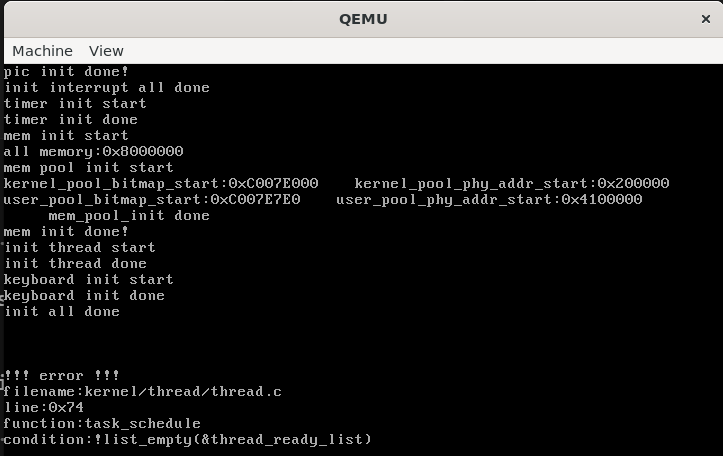
qemu_keyboard2

数据缓冲区的io队列如下

1
2
3
4
5
6
7
8
9
10
11
12
13
14
15
16
17
18
19
20
21
22
23
24
25
26
27
28
29
30
31
32
33
34
35
36
37
38
39
40
41
42
43
44
45
46
47
48
49
50
51
52
53
54
55
56
57
58
59
60
61
62
63
64
65
66
67
68
69
70
71
72
73
74
75
76
77
78
79
80
81
82
83
84
85
86
87
88
89
90
91
92
93
94
95
// 初始化io队列ioq
void ioqueue_init(struct ioqueue* ioq)
{
lock_init(&ioq->lock); // 初始化io队列的锁
list_init(&ioq->producers);
list_init(&ioq->consumers); // 生产者队列和消费者队列初始化
ioq->head = ioq->tail = 0; // 队列的首尾指针指向缓冲区数组第0个位置
}

// 返回pos在缓冲区中的下一个位置值
static int32_t next_pos(int32_t pos)
{
return (pos + 1) % bufsize;
}

// 判断队列是否已满
bool ioq_full(struct ioqueue* ioq)
{
ASSERT(_get_intr_status() == INTR_OFF);
return next_pos(ioq->tail) == ioq->head;
}

// 判断队列是否已空
bool ioq_empty(struct ioqueue* ioq)
{
ASSERT(_get_intr_status() == INTR_OFF);
return ioq->head == ioq->tail;
}

// 使当前生产者或消费者在此缓冲区上等待
static void ioq_wait(struct list* waiters, struct lock* lock)
{
struct _task_struct* cur = running_thread();
ASSERT(!elem_find(waiters, &cur->general_tag));
list_append(waiters, &cur->general_tag);
lock_release(lock);
thread_block(TASK_BLOCKED);
lock_acquire(lock);
}

// 唤醒waiter
static void ioq_wakeup(struct list* waiters)
{
if(!list_empty(waiters))
{
struct _task_struct* thread_blocked = elem2entry(struct _task_struct, general_tag, list_pop(waiters));
thread_unblock(thread_blocked);
}
}

// 消费者从ioq队列中获取一个字符
char ioq_getchar(struct ioqueue* ioq)
{
ASSERT(_get_intr_status() == INTR_OFF);
lock_acquire(&ioq->lock);
// 若缓冲区(队列)为空,把消费者加入ioq->consumer等待队列
while(ioq_empty(ioq))
{
ioq_wait(&ioq->consumers, &ioq->lock);
}
char byte = ioq->buf[ioq->head]; // 从缓冲区中取出
ioq->head = next_pos(ioq->head); // 把读游标移到下一位置
ioq_wakeup(&ioq->producers); // 唤醒生产者
lock_release(&ioq->lock);
return byte;
}

// 生产者往ioq队列中写入一个字符byte
void ioq_putchar(struct ioqueue* ioq, char byte)
{
ASSERT(_get_intr_status() == INTR_OFF);
lock_acquire(&ioq->lock);
// 若缓冲区(队列)已经满了,把生产者加入ioq->producer等待队列
while(ioq_full(ioq))
{
ioq_wait(&ioq->producers, &ioq->lock);
}
ioq->buf[ioq->tail] = byte; // 把字节放入缓冲区中
ioq->tail = next_pos(ioq->tail); // 把写游标移到下一位置
ioq_wakeup(&ioq->consumers); // 唤醒消费者
lock_release(&ioq->lock);
}

// 返回环形缓冲区中的数据长度
uint32_t ioq_length(struct ioqueue* ioq)
{
uint32_t len = 0;
if(ioq->head <= ioq->tail)
{
len = ioq->tail - ioq->head;
}else{
len = bufsize - (ioq->head - ioq->tail);
}
return len;
}

0x03 测试

main.c

1
2
3
4
5
6
7
8
9
10
11
12
13
14
15
16
17
18
19
20
21
22
23
24
25
26
27
28
29
30
31
32
33
34
35
36
37
38
39
40
41
42
43
44
45
46
47
48
49
50
51
52
53
54
55
56
57
#include "init.h"
#include "debug.h"
#include "interrupt.h"
#include "memory.h"
#include "thread.h"
#include "console.h"
#include "kernel/print.h"
#include "keyboard.h"
#include "kernel/ioqueue.h"

void k_thread_a(void*); //自定义线程函数
void k_thread_b(void*);

int main(void)
{
print("kernel made by r3t2\n");
init();
char* strA = " thread_A_";
char* strB = " thread_B_";
thread_create("testA", 31, k_thread_a, strA);
thread_create("testB", 31, k_thread_b, strB);
_enable_intr();
while(1);
// {
// console_put("main thread");
// }
return 0;
}

void k_thread_a(void* arg)
{
while(1)
{
_intr_status old_status = _disable_intr();
if(!ioq_empty(&kbd_buf))
{
console_put(arg);
char byte = ioq_getchar(&kbd_buf);
console_put(byte);
}
_set_intr_status(old_status);
}
}
void k_thread_b(void* arg)
{
while(1)
{
_intr_status old_status = _disable_intr();
if(!ioq_empty(&kbd_buf))
{
console_put(arg);
char byte = ioq_getchar(&kbd_buf);
console_put(byte);
}
_set_intr_status(old_status);
}
}

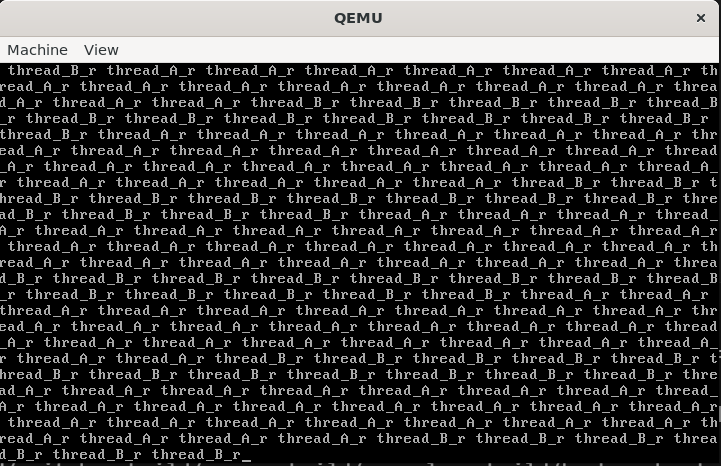
运行后按住 r 键不松效果如下

qemu_keyboard

两个线程交替读取到输入的数据,符合预期